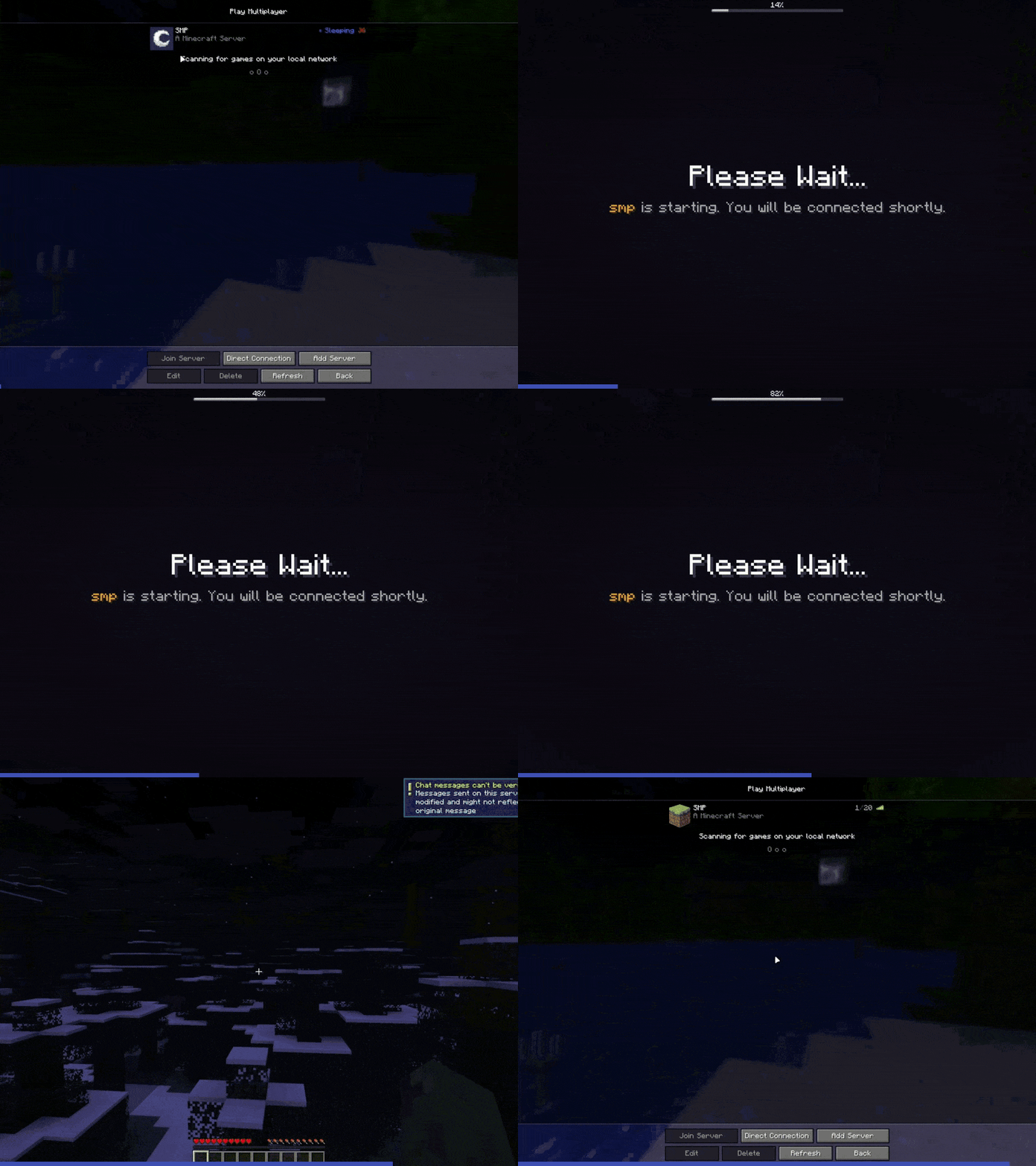
Auto Start/Stop with Custom Ping Response
This example demonstrates AutoStartStop's core automation features: automatic server starting, stopping, and custom ping/MOTD responses. The configuration shows how to automatically start servers when players connect, stop them when empty, and customize server list responses based on server status.
Configuration
defaults:
  server:
    control_api:
      type: 'amp'
      ads_url: 'http://localhost:8080/'
      username: 'instance_management_bot'
      password: '123456789+Abc'
    startup_timer:
      auto_calculate_expected_startup_time: true

servers:
  smp:
    virtual_host: smp.example.com
    control_api:
      instance_id: 'f790deae-3fde-4049-8085-c51b19522526'
  limbo:
    control_api:
      instance_id: '8172f21e-5a16-473f-a3f1-12731a6b358a'

rules:
  start_on_proxy_start:
    template: 'start_on_proxy_start'
    servers: [limbo]

  stop_on_proxy_shutdown:
    template: 'stop_on_proxy_shutdown'
    servers: [limbo, smp]

  start_on_connection:
    template: 'start_on_connection'
    servers: [smp]
    mode: waiting_server
    waiting_server:
      server: limbo
      start_waiting_server_on_connection: true

  stop_on_empty:
    template: 'stop_on_empty'
    empty_time: 15m
    servers: [smp]

  respond_ping_smp:
    template: 'respond_ping'
    servers: [smp]
    offline:
      use_cached_motd: true
      version_name: '<blue>◉ Sleeping'
      protocol_version: -1
      icon: icons/smp-sleeping.png
    online:
      icon: icons/smp-icon.png
Server Icons
The following icons are placed in the icons directory:
-

icons/smp-sleeping.png
SMP server icon when offline
-

icons/smp-icon.png
SMP server icon when online
Icon Requirements
Server icons must be 64x64 pixel PNG images. You can place them in any directory accessible to the plugin.
What This Configuration Does
This configuration demonstrates AutoStartStop's key automation features:
- Auto-start on connection: Servers start automatically when players try to connect
- Auto-stop when empty: Servers stop automatically after being idle
- Graceful shutdown: All servers stop cleanly when the proxy shuts down
- Custom ping responses: Server list shows different information based on server status
Demo
Here's a demonstration of the configuration in action: